"Make Soup": Designing an Incident Reporting System for Outdoor Programs
The story, and research, behind the incident reporting system in Field Risk OS.
By George Bull ·
Here for the system, not the story? Skip to how incident reporting works in Field Risk OS™.
"Make soup."
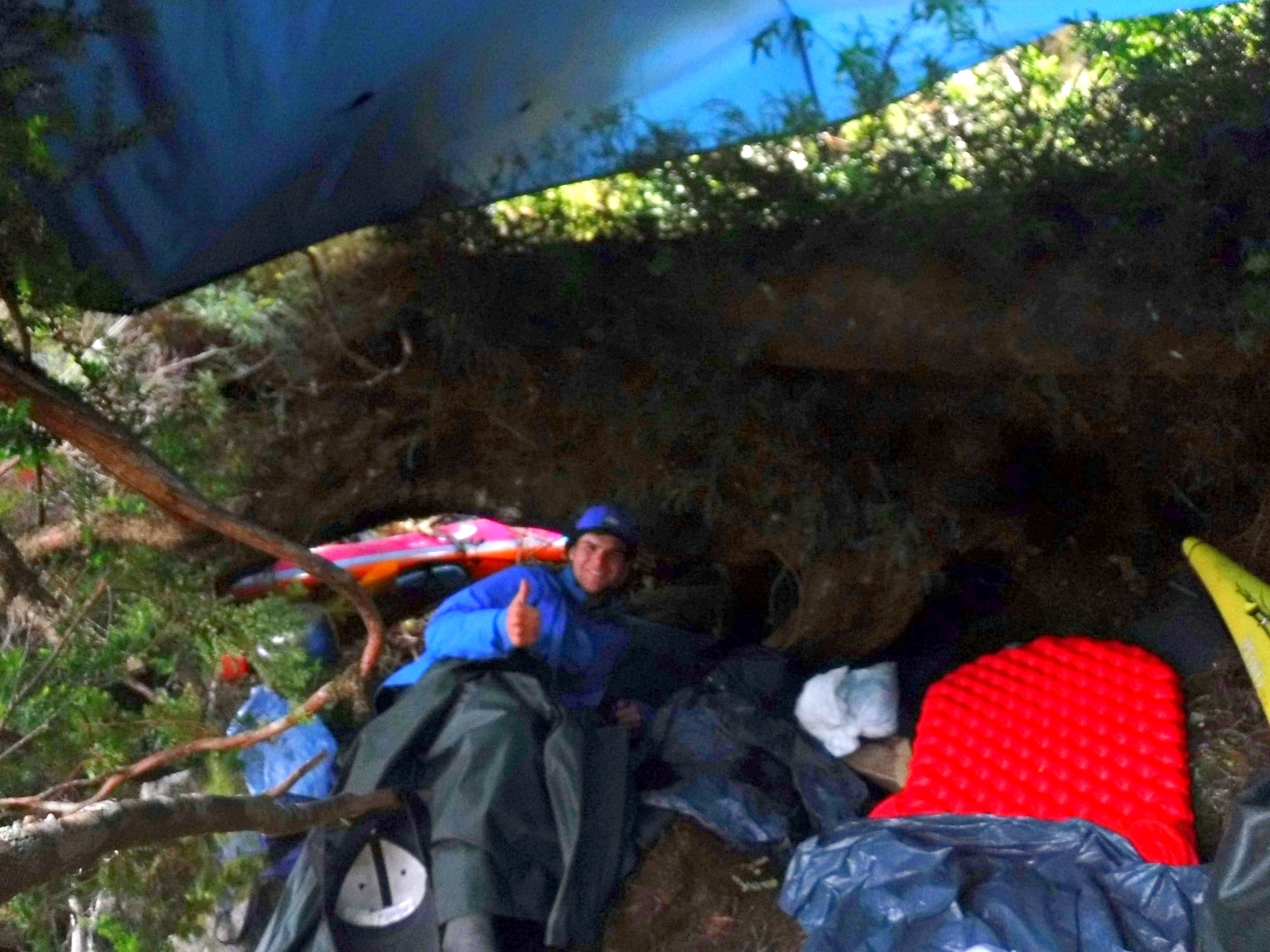
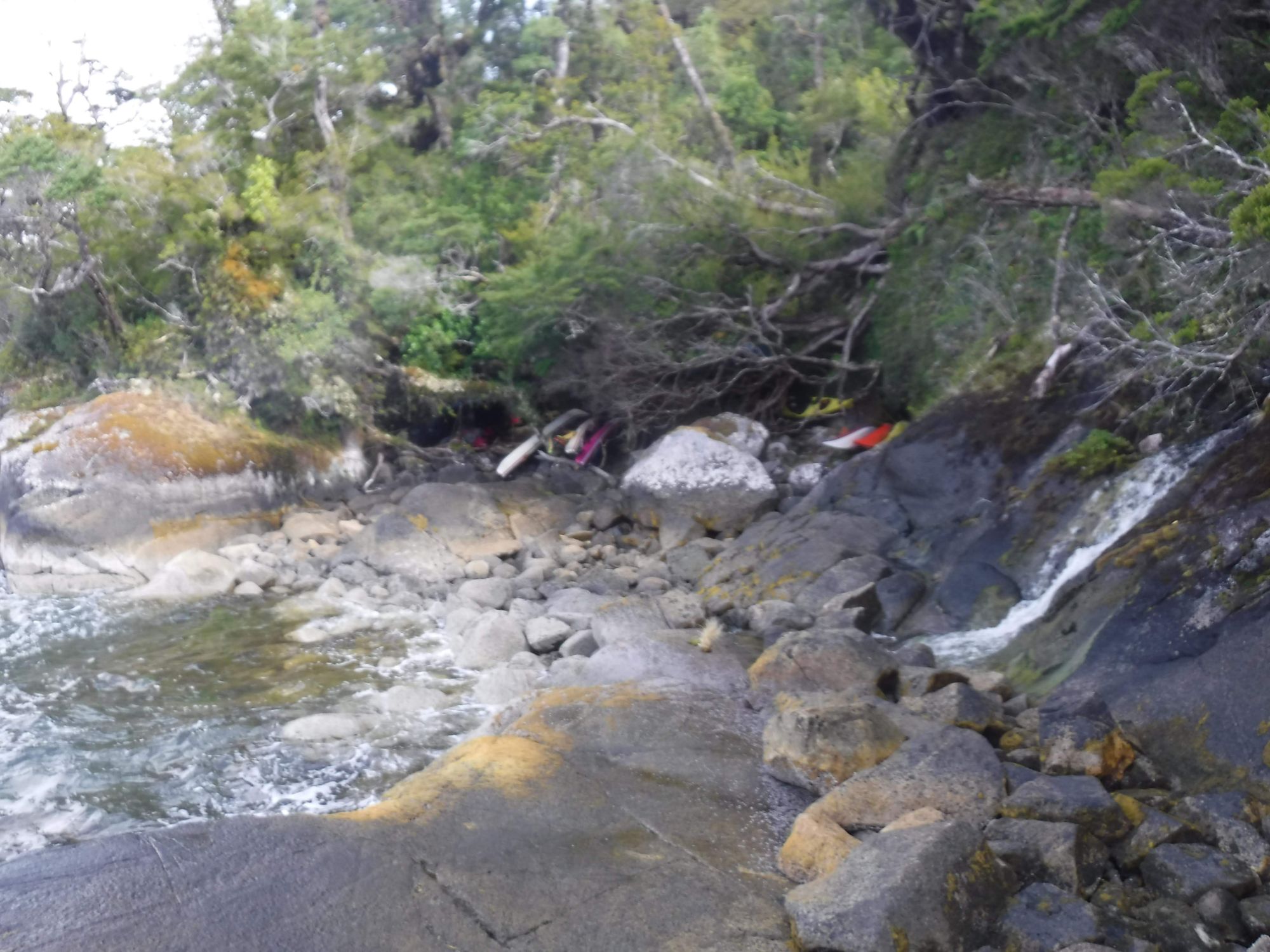
I laugh at those words more in hindsight than I did in the moment, almost eight years ago on Isla Marina Jarpa in Patagonia, Chile.
Large squalls had pushed our sea kayaking group off the water and into a cliffed-out, rocky cove on the northern bank of the Baker Channel. I'd spent the previous night in a muddy, tidal zone pit we called the Hobbit Hole, and would spend the next three there too. My sleeping bag was wet, and I was tired and hungry.
"How are we doing on food?" our instructor asked.
We had just wrapped up that morning's weather check. It was raining sideways and the seas were crashing over the rocks around us, so we weren't going anywhere.
As we were on day 12 of a 12-day ration, "Not great," was the unanimous response to the food question. Our next ration was at a beach less than five miles down the coast. So close. So far.
"Make soup. The food will last longer."
So we did. The food stretched longer and we waited out three more days of the storm.
And I fell in love with incident reports.
The Kindle
On our course, we carried the "NOLS Kindle" everywhere we went, loaded with lesson plans, team building activities, short stories and, most relevant here, dozens and dozens of NOLS incident reports. As we sat in our hole and waited out the storm, I read all of them. And then I read them again. And then I read a few for a third time, as well.
Some I still remember clearly: a Denali expedition caught in a storm, a bear encounter next to a roaring river, and a mountaineering incident involving rockfall on a glacier. The reports were a way to learn from other people's experience, to imagine what I'd do in those scenarios, and to think through what was done well and what could have been done better. By the end of the semester, there was a running joke on course that I had every NOLS incident report memorized.
"File a Near Miss"
One thing I didn't think about while reading those reports was what it takes to write one. I found out within weeks of starting my career in the outdoor industry, as a seasonal trip leader at a summer camp.
I was behind the wheel of a program van on a rural two-lane highway when a truck pulled out in front of me. Another staff member in the van mentioned that she felt it had been a pretty close call.
Afterward, I went to my manager and asked: "Should I file a near miss?"
In the back of my mind, I was worried. Would it make me look like a bad driver? Would it hurt the reputation I was trying to build with this organization?
"Absolutely, file it," he said.
The organization didn't blame me or embarrass me. It treated my report as a data point to learn from. It turned out that spot on the highway was one where a lot of drivers had close calls. In future years, that specific turnout became part of our van driver training for all staff.
How the organization responded made me trust it more: both the people and the systems. (I told the full story on my podcast, Field Debrief.) So the next time I had a near miss or an incident, I filed it, and I kept filing them liberally throughout my years with the program. If leadership had responded differently to that first near miss, I'm not sure I would have filed the next one.
When I moved into program management, I saw incident reporting from the other side of the table. "File a near miss" and "file an incident report" became some of my more common phrases. That wasn't because we had an unusually high number of either (at least to my knowledge; reliable benchmarking is a nut our industry has yet to crack). It was because a program running 70 backcountry trips per summer has plenty to document.
From a program leader's perspective, an incident report's job is to tell you when something needs to change. Drew Leemon of NOLS put it this way in 2004: "By understanding our incident history, by maintaining a verifiable record of incidents, and by analyzing past incidents, we are better able to identify if and when changes in risk management methods might be necessary."
Doing that job well takes two things: the report has to get filed, and it has to get learned from. Both run into structural and cultural challenges, and both are what incident reporting in Field Risk OS is built around.
Incident Reporting in Field Risk OS
The below covers core incident reporting features in Field Risk OS, not its full scope or every detail. Field Risk OS is highly customizable. For more information, or to see if it could fit your program, school or summer camp, reach out at george@fieldrisksystems.com.
Field Risk OS's incident reporting tools give staff, and anyone else your program requires, an efficient, consistent way to record incidents and near misses, and give program leaders one place to review, learn from, and report on them.
The design draws on my own time running an incident reporting system, published research and guidance from across the outdoor industry, and conversations with safety and program leaders at camps and schools.
Part 1: Filing the Report
What Makes a Good Report
A good incident report is the beginning of every conversation that follows it, and everyone in that conversation should be working from the same set of facts.
Most programs still run reporting on paper forms or spreadsheets. In my experience, many of those reports end up in a file, look different depending on who wrote them, and are hard to compare from one season to the next.
The guidance for fixing that has been around for a while. Drew Leemon's 2004 article laid out what a reporting system needs, from a simple form to a culture that learns from incidents rather than punishing them, and the Wilderness Risk Management Committee's incident report form put much of it into a standard format that many programs have built their own forms from since.
What's changed is the technology. A digital form can change its questions based on earlier answers, break into stages with definitions next to each choice, and land every report in one place for analysis. Many programs have moved to a Google or Microsoft Form that feeds a spreadsheet, which can be a step up from paper. These general tools often carry real limitations though. Anyone with edit access can change a cell after the fact, sharing is all or nothing, and a row has no connection to the trip it came from. Plus, these one-off systems need to be built and maintained, often by one person in the organization who spends valuable time administering the systems and then, commonly, leaves with the institutional knowledge of how it works as well.
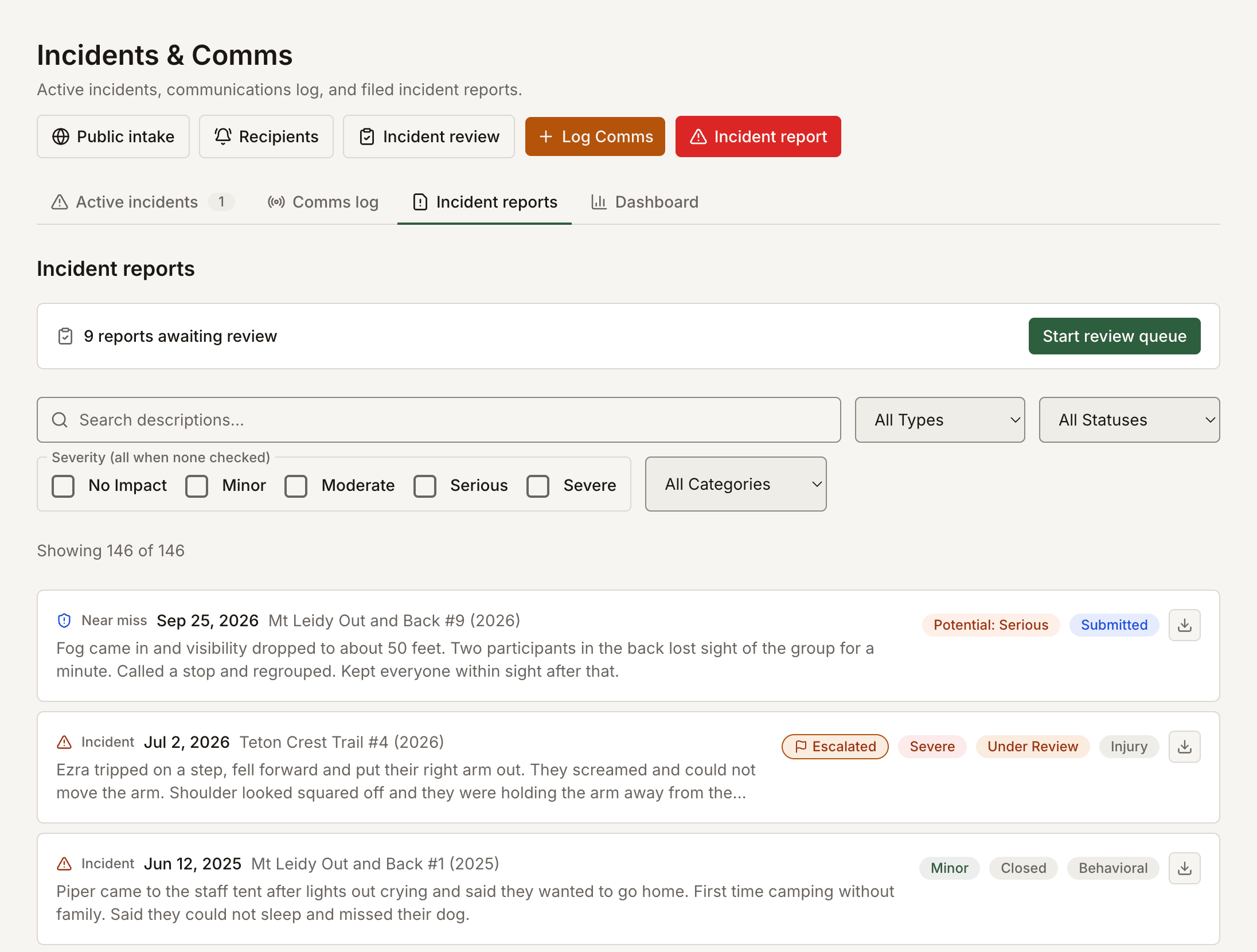
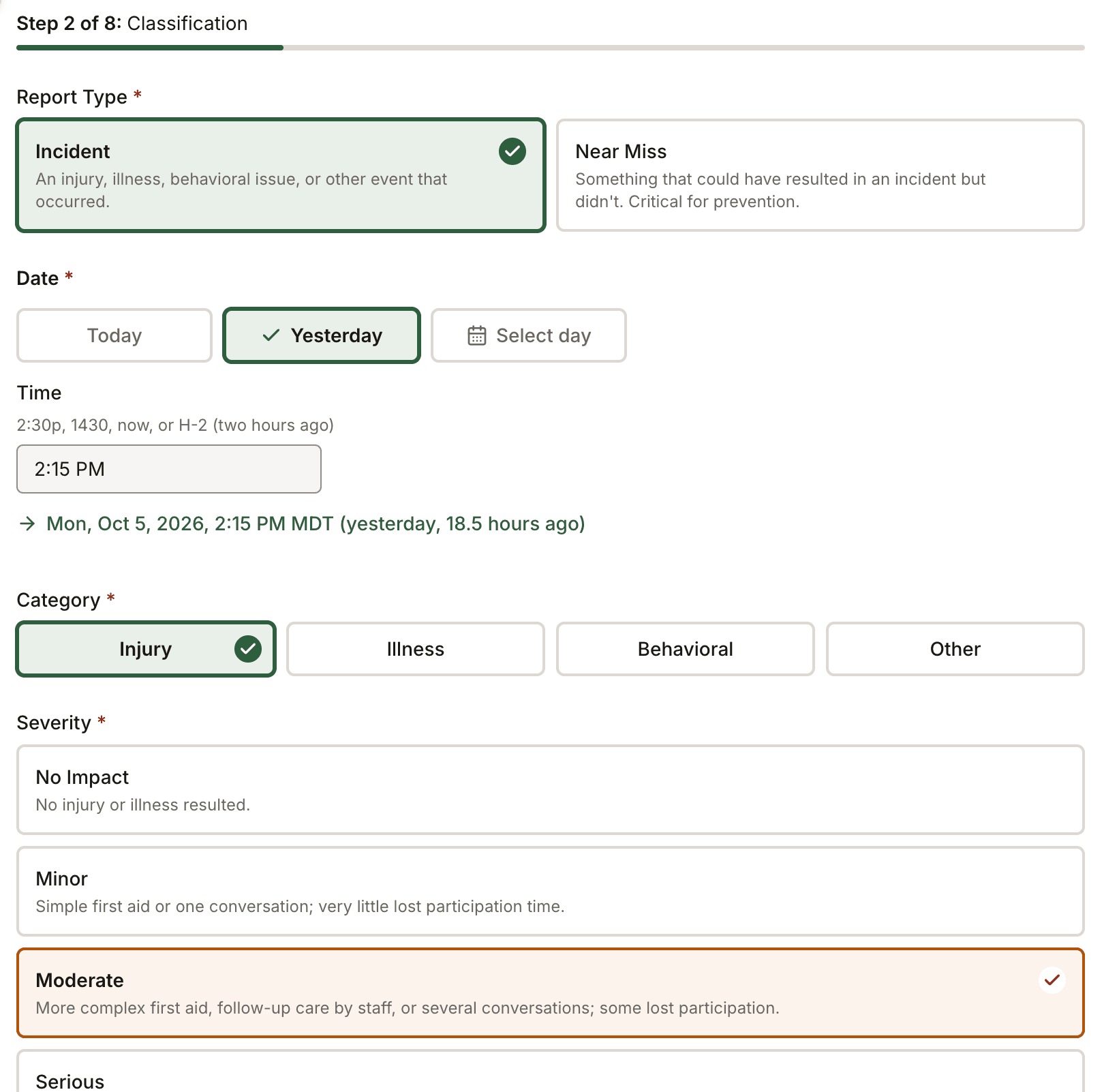
The incident report in Field Risk OS addresses those gaps. Severity uses five levels, each defined on screen. Every report includes the reporter's account of what led up to the event, because people usually do what makes sense to them at the time, and an outcome alone can't show why. Once filed, a report can't be edited, can be restricted to the people who need it, and stays linked to the trip, roster, and plan it came from. There's no automated scoring or AI analysis involved. The thinking happens between your ears.
Staff can file from a phone or a computer, and the phone's home screen opens to Incident Report, Near Miss, and Comms Log. If a phone loses signal, the report isn't lost. For people without a staff account, a program can share a reporting link or post a printed QR code, so parents, caregivers, volunteers, and partner organizations can file too.
Every trip debrief asks whether there were any incidents or near misses that haven't been reported yet. If the answer is yes, the debriefer can set a follow-up to make sure the report gets filed.
When the Report Is Sensitive
Safeguarding and child protection concerns are some of the most sensitive records a program keeps, and they often come from a parent, a volunteer, or a participant.
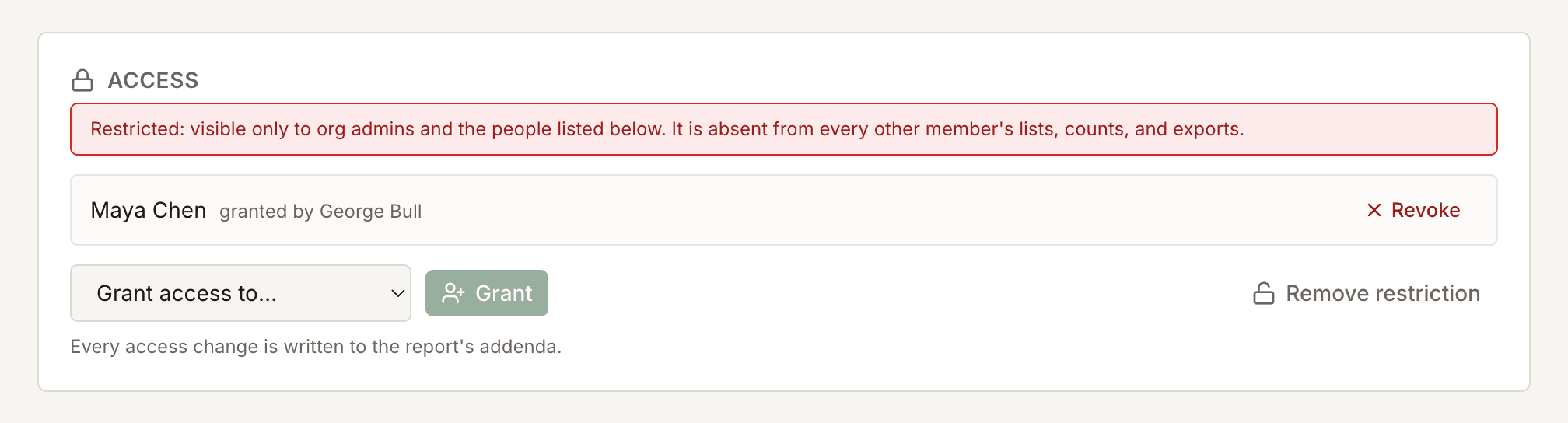
An administrator can restrict any report. Once it's restricted, the report and everything attached to it is visible within the program only to the specific people granted access for that case. Every restriction, grant, and removal is recorded on the report, and every time someone opens it is logged.
During an Active Incident
At a field camp in Antarctica, I watched active situations unfold where most of the information lived in one person's head. In one example, we were trying to track down members of a foreign team, coordinating among leaders across many locations. Our field camp manager had to give the same update to person after person while still managing the situation.
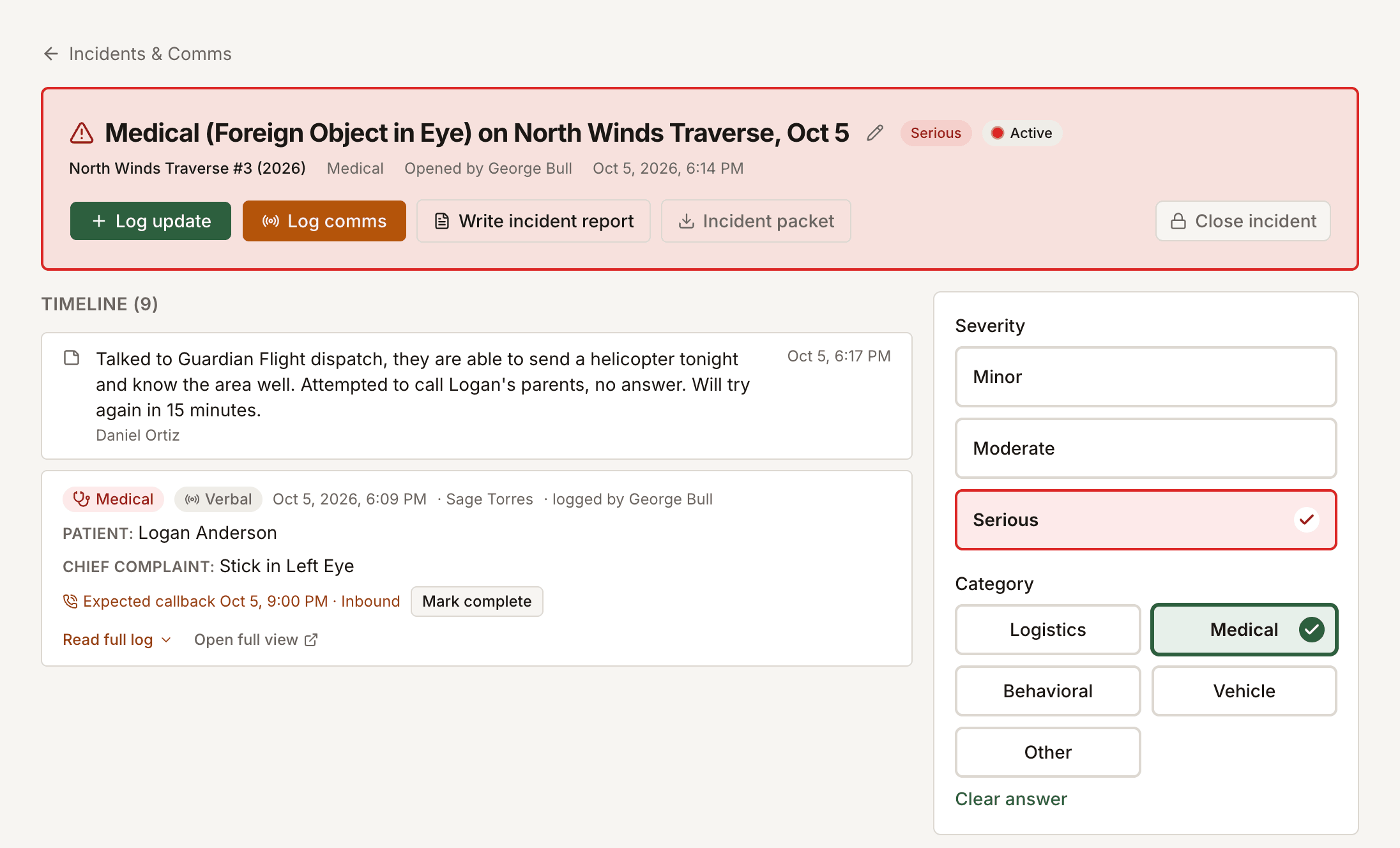
Field Risk OS keeps an active incident record, a working timeline where communications, updates, and next steps get logged as they happen. The people you choose can read it, including the comms log, without pulling the person running the response away from their role.
Once the situation is over, the formal incident report is written and linked to that record, so whoever writes it is working from what was logged at the time. (More on the comms log in My First Sat Phone Call as an Outdoor Program Manager, and on shared incident briefings in ICS Form 201: A Shared, Scalable Incident Briefing for Outdoor Programs.)
Near Misses
My van near miss could easily have stayed a conversation in my manager's office, and plenty of near misses do.
A near miss count measures trust as much as risk. A program that files none almost certainly still has them; more likely, its staff don't think filing is worth the effort, or they worry about what happens after they do. Drew Leemon made the same point in his 2004 article on incident reporting: "It is better to receive an incident report of a close call that calls into question staff judgment than to not learn of it because staff fear they'll be penalized." When reports lead to blame, people stop filing, and a program can look safer on paper while becoming less safe. The near misses that matter most are the ones that could have been serious, because serious incidents often come from different conditions than minor ones (Martin and Black, 2015).
Field Risk OS has a separate near miss form, the "60-Second Near Miss", that staff can file from a phone in about a minute. Along with basic context and the nature of the near miss, the reporter documents the potential severity, so a program can see which close calls deserve the most attention.
Part 2: Learning From It
Reviewing a Report
Once a report is filed, it goes to program leadership for review. Who gets notified, and how, is set up for your program during onboarding.
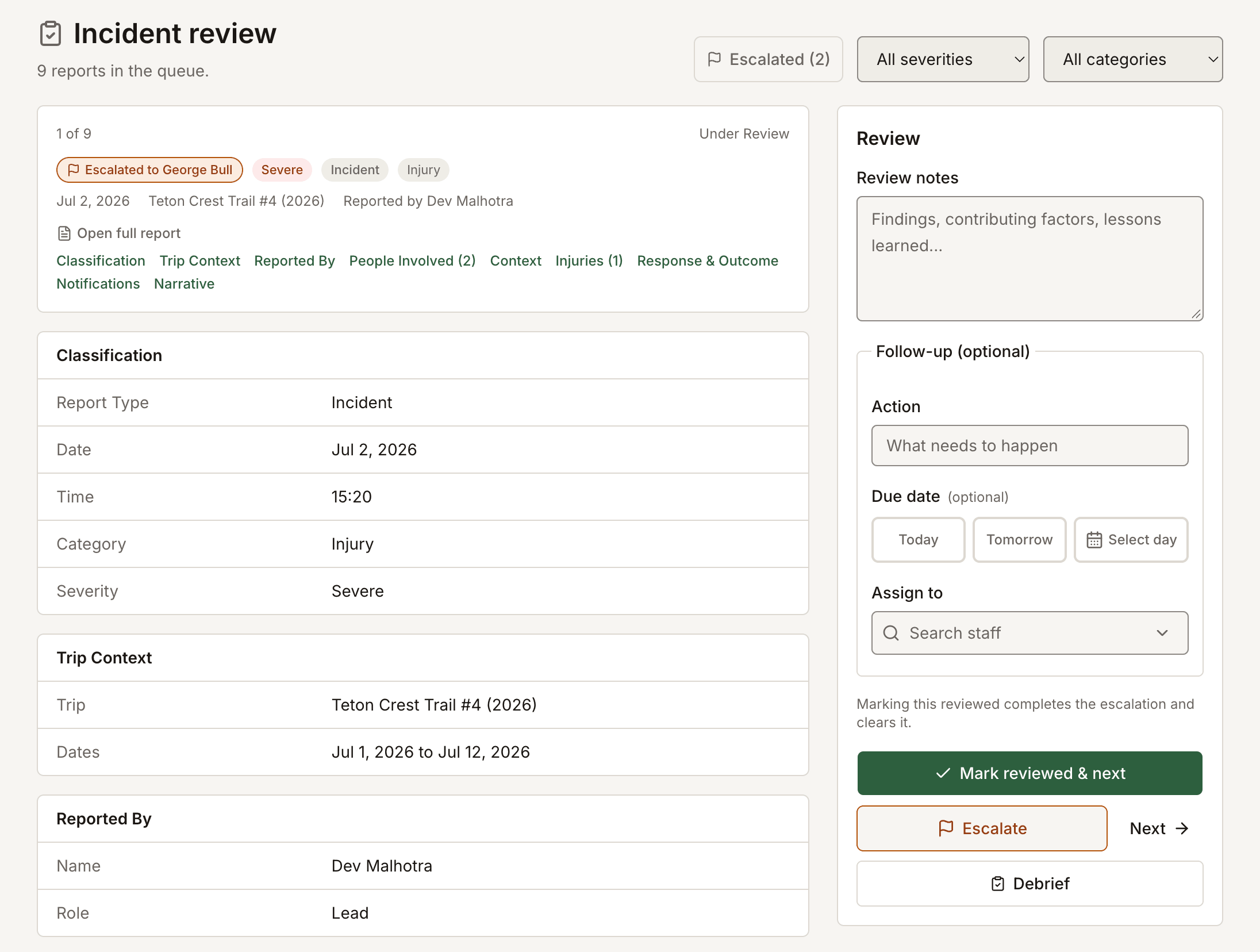
The reviewer writes review notes and next steps, and can assign a follow-up to a specific person with a due date, so every open item has an owner and stays visible until it's done. If someone else needs to see the report, the reviewer can escalate it to a named colleague, who gets an email with a link right away.
Learning From an Incident
As a program manager, I had a trip whose leaders continued on a route when the snow conditions weren't appropriate, and they ended up in a tough spot. We changed the route and altered their pickup. I hiked in to meet them and help with morale.
That incident led to the deepest trip debrief I've ever run. The incident report covered what happened. What it couldn't do on its own was explain why those decisions were made, or why they seemed like a good idea in the moment.
Before that conversation, I had to check my own mindset. The question couldn't be "what's the appropriate consequence?" It had to be "how do we make sure this doesn't happen again?" Safety researchers call this the New View of human error. It treats error as a symptom of conditions in the system, and assumes people usually did what made sense to them at the time. (Stuart Slay and I dig into human factors in the first Field Debrief episode, on Airblue Flight 202.)
What I learned was that I needed to change how we briefed that trip. In Field Risk OS, a lesson learned from an incident can be applied to the briefing for that specific trip or to every future trip brief, so the next leader on that trip learns about the hazard, and mitigation, in their briefing.
Lessons and contributing factors live in a separate incident debrief, apart from the factual report. That way a team can talk openly about systems and human factors without changing the record of what happened. (More on how trips and briefings are built in Field Risk OS.)
Out of the Filing Cabinet
This is the part I struggled with most as a program manager. I'd read the incident reports and debrief with the staff, and then the reports went into a figurative filing cabinet.
When the season wrapped up, I was caught up in cleaning, breaking down gear, and starting to plan next season. Going back through the pile to look for trends and carry them forward was hard to do. The learning happened one report at a time, and the season-level picture got lost.
Every next step a reviewer writes stays in the platform after the season ends. The reporting tools pull every next step from the season into one condensed list. A program leader can also get an emailed summary on a regular schedule, like monthly or quarterly, that lists the incidents they reviewed and the next steps they wrote down.
What to Show the Board
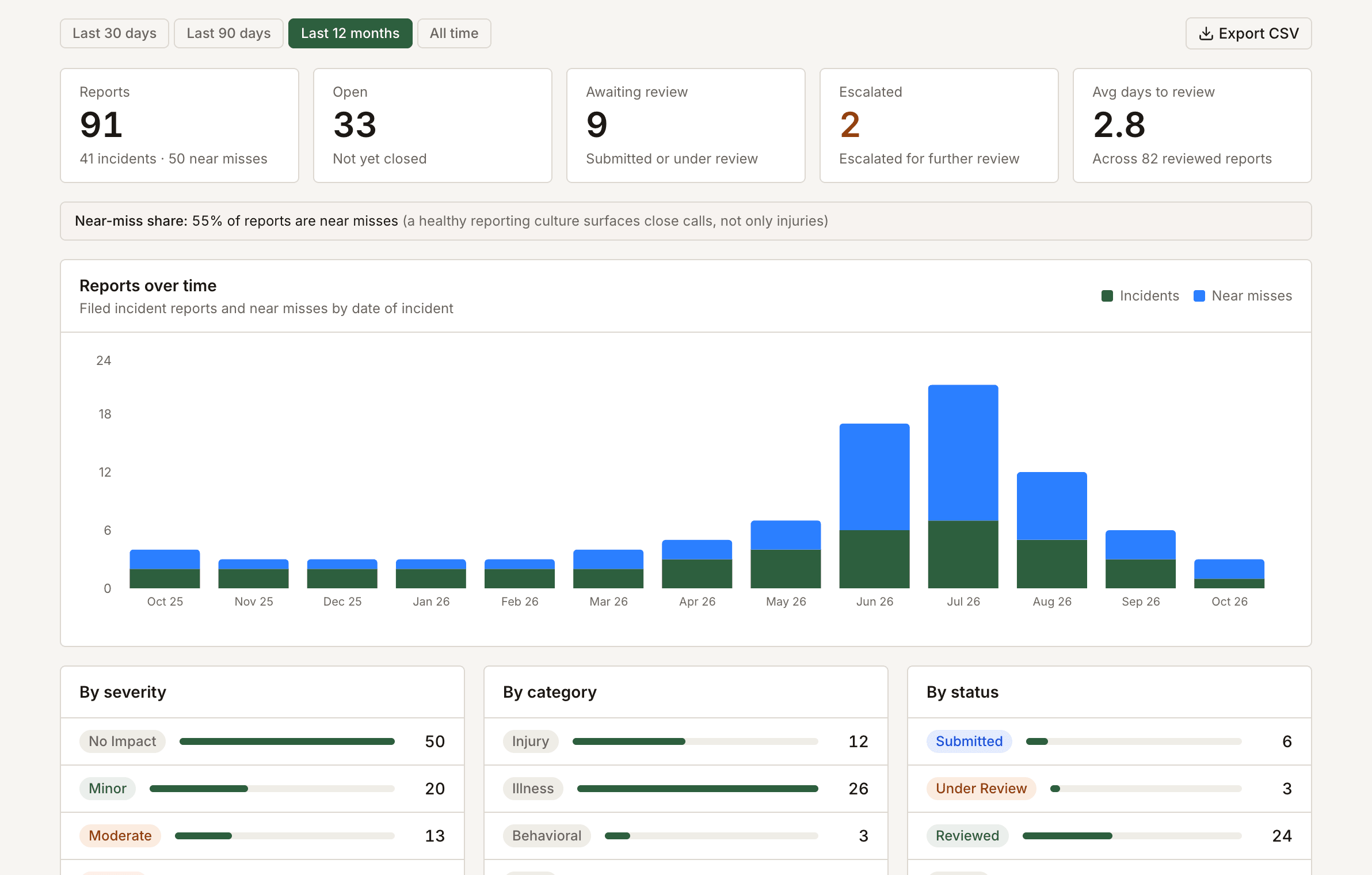
Boards usually ask four questions about incidents: how many, how serious, which direction they're trending, and what the program did about them.
The incident dashboard in Field Risk OS is customizable for each program, and it always shows incident and near miss counts, severity, and change over time. Program Stats adds incident rates per 1,000 program days, the standard way outdoor programs calculate incident rates, where a program day is one person in the program for one day. Because trips and rosters already live in Field Risk OS, program days come from the trip record automatically. Consistent categories also surface patterns a program might otherwise miss. In NOLS's data from fiscal years 2020 to 2025, for example, illnesses made up about two-thirds of field medical incidents.
If you use Field Risk OS, I'll help you build slides or graphics for board presentations from the dashboards you'll use regularly.
A Clear Chain of Events (A note on Legal, Insurance, and Liability Considerations)
Sometimes an incident has to be reported beyond the program, to an insurer, a board, or in a legal proceeding. When that happens, you need to be able to show the full sequence of events from start to finish.
In Field Risk OS, doing the work and recording it are the same step, so that record already exists in a standardized, time-stamped format. It starts before the trip with the trip plan and the briefing, including who was there for it. It continues through the trip with the communications logs and any active incident records. After the trip, it includes incident reports, the debrief and who attended it, and the next steps taken after review.
Filed reports can't be edited or deleted by anyone in the program, administrators included. Later information gets added as an addendum, a dated note attributed to its author, and photos and documents attach the same way. Every addendum, attachment, view, and access change is recorded in an audit trail.
The full record downloads as a single PDF incident packet, and the report data exports to a spreadsheet. Incident data is encrypted at rest and backed up. Your program controls its own records and can share them when it needs to.
Learn From What Goes Right, Too
Making soup on Isla Marina Jarpa never showed up in an incident report. It was a small adjustment that kept a hungry group fed through three more days of storm.
Safety-II research argues that everyday adjustments like that are most of what goes right in the field, and they happen far more often than incidents do. (More on Safety-I and Safety-II.) Every trip debrief in Field Risk OS records what went well alongside what didn't, so a program can learn from both.
"The more I explore Field Risk OS, the more excited I am about what it means for TVRC: streamlining our operations and helping us hold on to the institutional knowledge we've built on these trips year after year. Building our trips, briefing our staff, and having the reporting and dashboards to back it up, all in one system, is incredible."
Haley Preston, TVRC Education Foundation
Setting It Up for Your Program
Onboarding starts with me getting to know your program: how your trips run, how incidents get reported today, and how they get reviewed and followed up on. From there, I build your reporting needs into the incident report form and your actual review process into the review and follow-up steps. When your program needs something the platform doesn't do yet, that can get built out too.
Your staff end up filing on a form built around your program's own categories and process, and your leadership reviews reports the way that fits your program.
If you want to see what that could look like for your program, shoot me an email and we'll walk through how your current processes might operate through Field Risk OS.
A note on Field Risk OS and incident response: Field Risk OS is documentation and workflow software. It is not an incident response, incident management, emergency notification, or risk management service. It doesn't monitor trips or incidents, dispatch help, contact emergency services, assess risk, or direct anyone's response. Field Risk Systems™ does not provide trip services or risk management advice through the platform.
Everything in Field Risk OS is entered by a program's own people. Notices go out only when a person takes an action or on a summary schedule the program sets, and they aren't monitored and shouldn't be relied on to summon help. Each program remains responsible for its own emergency procedures, communications, training, mandated reporting, and decisions.
Sources: NOLS, "Expedition Risk Management at NOLS: Background" (revised October 2025, fiscal years 2020 to 2025). Drew Leemon, "This Is No Accident: Improving Risk Management through Incident Reporting", The Outdoor Network, Winter 2004. Wilderness Risk Management Committee, Incident Report form instructions (hosted by Princeton Outdoor Action). Georgia College Outdoor Education, Incident Report Form, developed from the WRMC Incident Data Reporting Form (September 2001 version). Donald K. Martin and Alison A. Black, "Preventing Serious Injuries & Fatalities: Study Reveals Precursors & Paradigms", Professional Safety, September 2015. Sidney Dekker, The Field Guide to Understanding 'Human Error' (3rd ed., 2014). Erik Hollnagel, Safety-I and Safety-II: The Past and Future of Safety Management (2014). Erik Hollnagel, Robert Wears, and Jeffrey Braithwaite, From Safety-I to Safety-II: A White Paper (2015).
Related: My First Sat Phone Call as an Outdoor Program Manager | Designing a Trip Planning System for Outdoor Expedition Programs
Field Risk OS is a documentation and workflow platform for outdoor programs, including summer camps, schools, and outdoor education organizations.