Designing a Trip Planning System for Outdoor Expedition Programs
How backcountry trips are planned, mapped, briefed, debriefed, and more on Field Risk OS™.
By George Bull ·
Ask ten expedition programs how they plan a trip, and in some form or another, you'll see the same stack of documents assemble itself.
The itinerary lives in a Word Doc, Google Sheets, or paper binder. The route lives in a mapping app with years of accumulated, often outdated, GPX artifacts. The roster, with vital information like allergies and emergency contacts, is in a separate spreadsheet or CRM platform. Leaders' trip histories, certifications, and past evals are in a web of spreadsheets and paper forms, if they're tracked at all. The permits and end-of-season use reports are PDFs in an email thread. The briefing form, the checkout form, and the debrief form are separate documents that need to be built, as an extra step, for each trip. And the part that ties it all together, how the trip is actually supposed to run, lives in a program manager's head with near zero redundancy.
This is a reality I'm very familiar with because I've lived it. I've lived the late nights literally stapling trip packets together as a program manager. I've lived the hours that add up over a season from digging through wrinkled papers in a binder to find a trip's debrief form from the year prior, or watching an incident report get filed away to a folder with lessons still to learn - to be reviewed "when we have time". And I've been the program manager that left an organization with lots of institutional knowledge inside my head, doing my best to leave detailed notes but without a good structure for them to live in.
The trip management system is the part of Field Risk OS that replaces that stack with one thing: a trip as organized data, throughout its entire lifecycle. Route, itinerary, hazards, staffing, people, certifications, documents, detailed notes, and lessons learned tied together in a structure your program can see, plan, brief, and carry into the field. Field Risk OS is expedition program management software, built for the way outdoor programs actually run trips. This post is about how it works and the thinking behind it.
Build a Trip Once, Run It All Season (and Beyond)
Field Risk OS separates two things that often get tangled together: the plan for a trip and a specific run of that trip.
A trip template is the reusable plan. A trip is one instance of it. You build the template once, then deploy as many trips from it as you want. That single split is what turns a good trip plan into a program asset instead of a one-off operation, and it shapes everything on the platform downstream.
Trip Templates
Your trip templates are the core of your system.
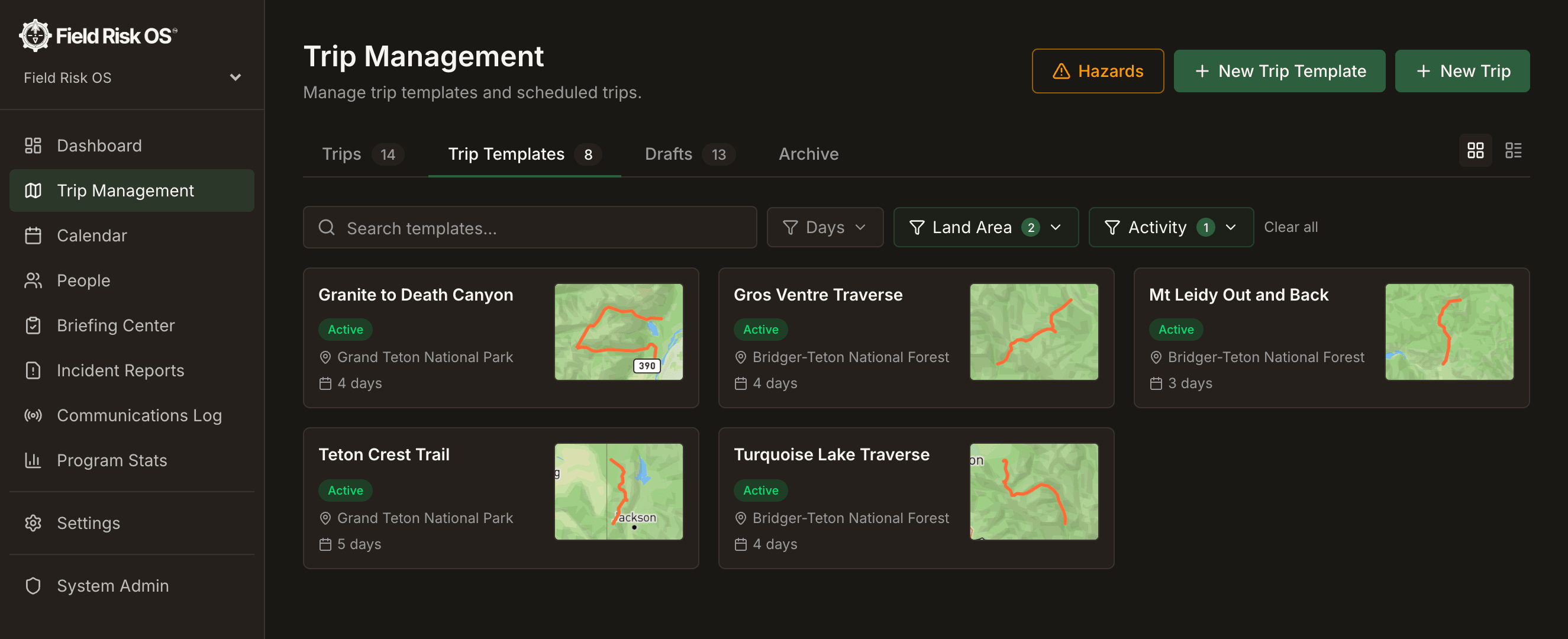
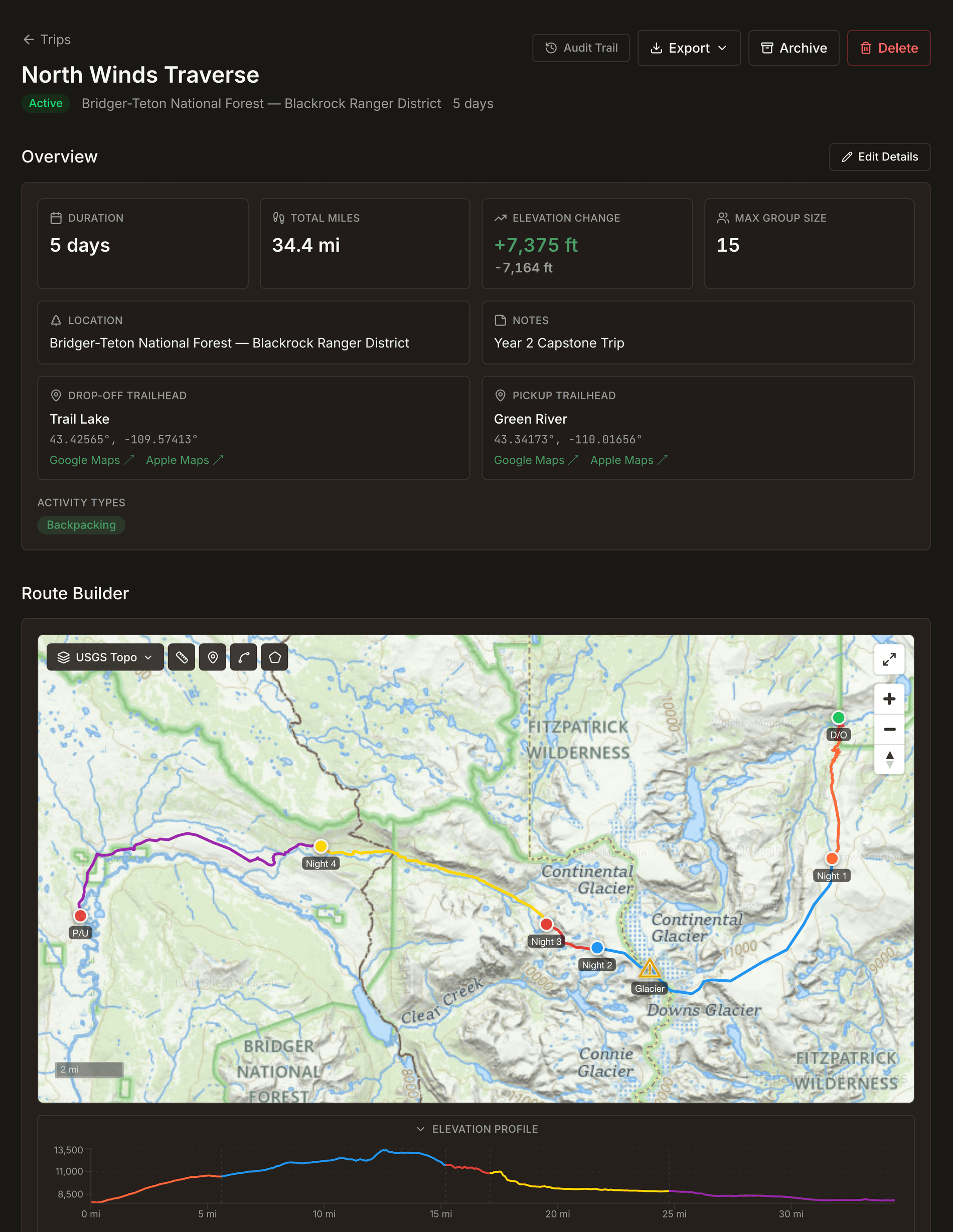
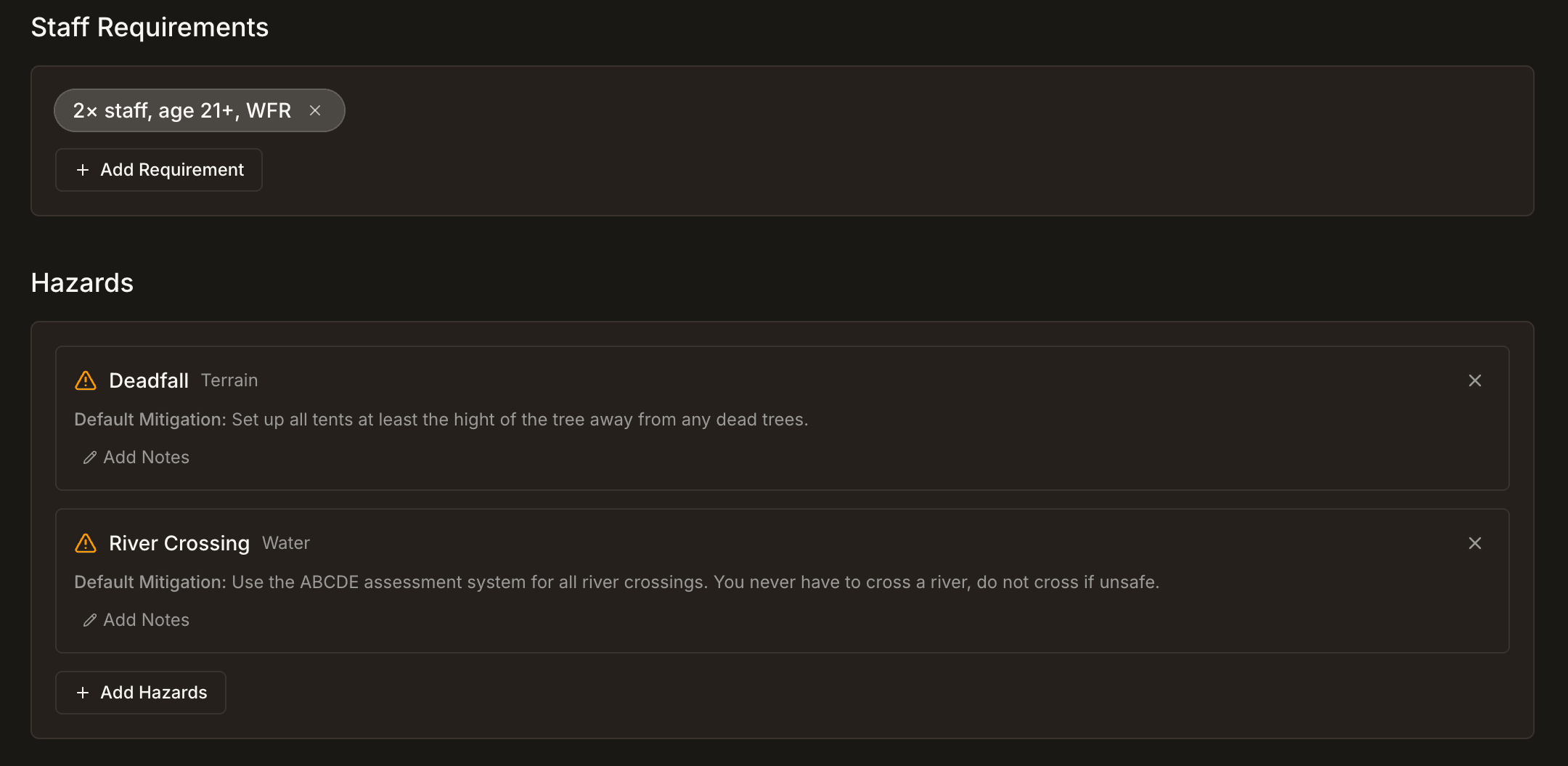
In the route planner, you draw the route day by day and map the details that define it: campsites, drop-off and pickup points, alternate and evacuation routes, hazards, custom areas, and free-text waypoints. Alongside the map you build a detailed, day-by-day itinerary; this is where you record that the best lunch spot is at the saddle before the day-two climb, that the creek in the meadow at mile six is a great place to teach a river-crossing class, that there's a good bear hang tree just east of the night-three campsite. You set the staffing requirements, document the hazards specific to that route, record the maximum group size, the supporting documents, and the day-by-day land agency and land-use information. You carry forward notes and lessons learned from prior debriefs and incident reports.
In many programs this kind of detail lives in someone's head, or in a stack of files that only one person knows how to dig through. It gets relearned on every trip, or worse, it never gets learned at all. A template captures it once, from whoever knows the route best, and pushes it to every trip that follows. Every future trip starts from accumulated experience instead of a blank page.
And because a template holds structured data rather than loose notes, the trips built from it can act on that data. The day-by-day land-use information, for example, carries into a trip, so your land-use reporting (user days by land manager) is there without the manual calculations.
Trips and the Trip Lifecycle
When you deploy a trip from a template, it inherits everything (route, elevation, itinerary, trailheads, hazards, staffing, and more), including all the hard-learned lessons. The leader running it for the first time gets the water-break spots, the teaching sites, and the night-three bear hang tree without having to rediscover them. If needed, you can adjust the trip for this group. Move a campsite, add a layover day, change the route. The template stays clean as the canonical version; each trip is free to diverge as reality demands.
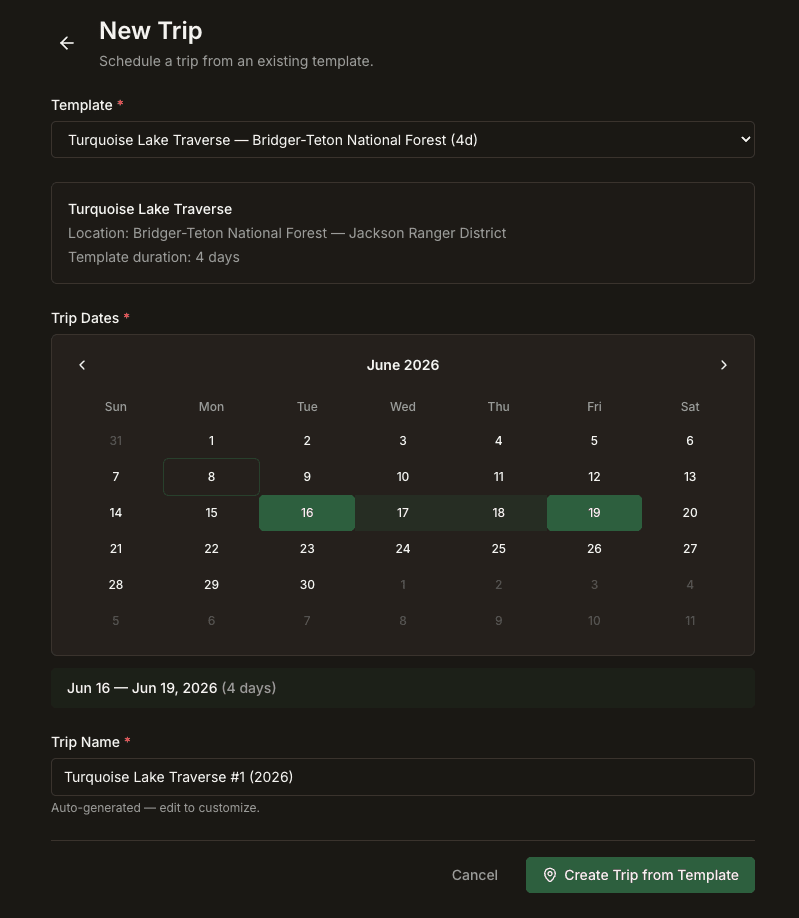
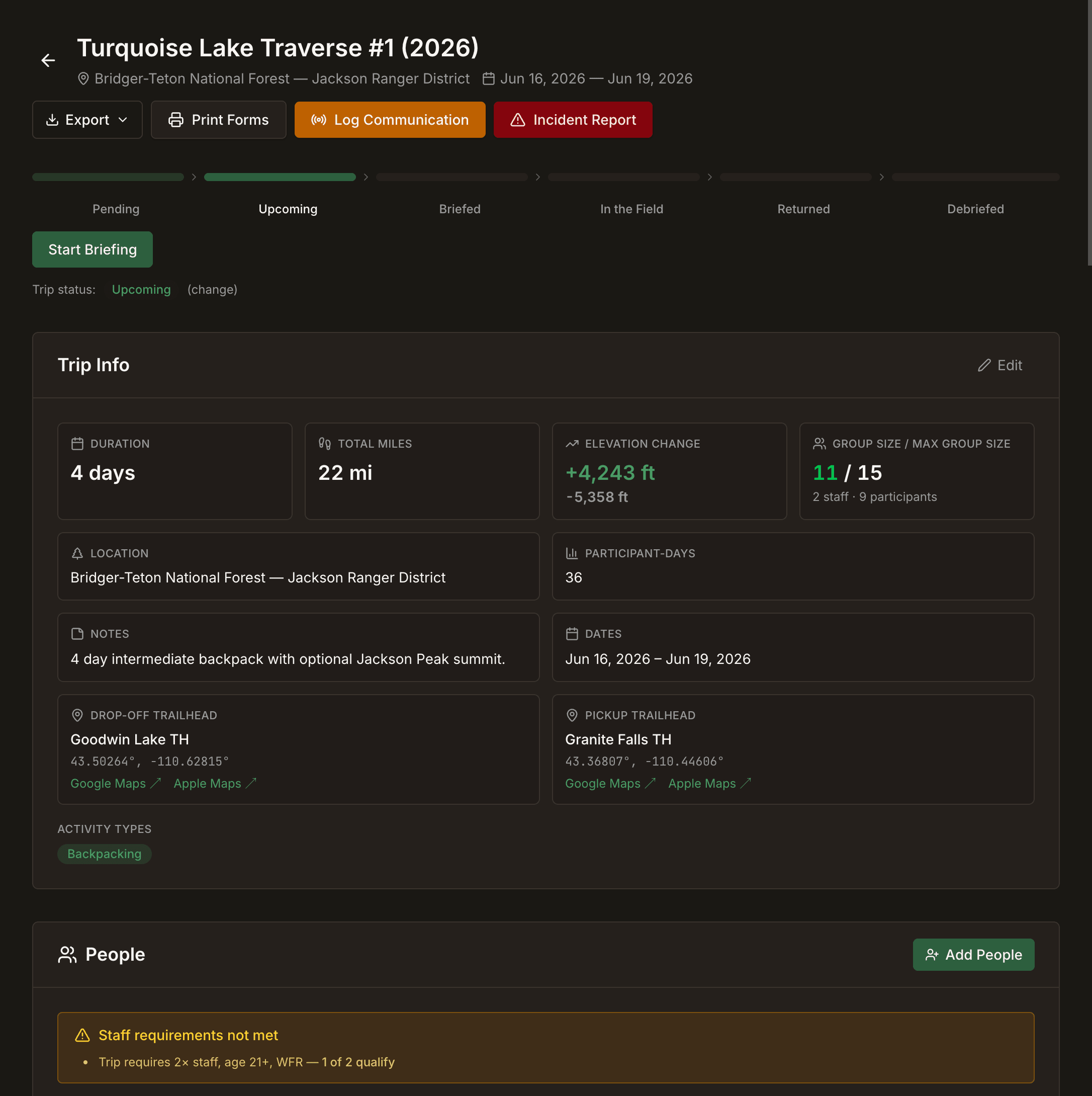
The trip is where you set dates, staff the trip, add participants, and add trip instance specific information. This is also where you can attach documents like trip-specific permits and special-use authorizations.
Trips move through a defined lifecycle (draft, scheduled, briefed, in the field, returned, debriefed), and the system helps you keep track of which trips need briefing, debrief, and more.
The Anatomy of a Trip
The Mapping System
Field Risk OS features digitized USGS topographic maps, the same USGS topos your leaders already use, so what you plan looks like what they'll navigate on. You build the route the way the trip actually runs: drop-off point, each day's leg, each night's campsite, then the pickup point, with a guided flow that advances day by day.
On top of the route, you place the things that matter in the field:
- Custom waypoints: think alternate campsites, water sources, helicopter landing zones, hazards pulled from your program's own hazard library, and free-text pins.
- Zones: areas rather than points, like a wildfire safe zone, a camping zone, or a restricted area.
- Alternate and evacuation routes: drawn as tracks alongside the primary route, easily differentiated, but clear, so the bail-out plan lives on the same map as the plan it backs up.
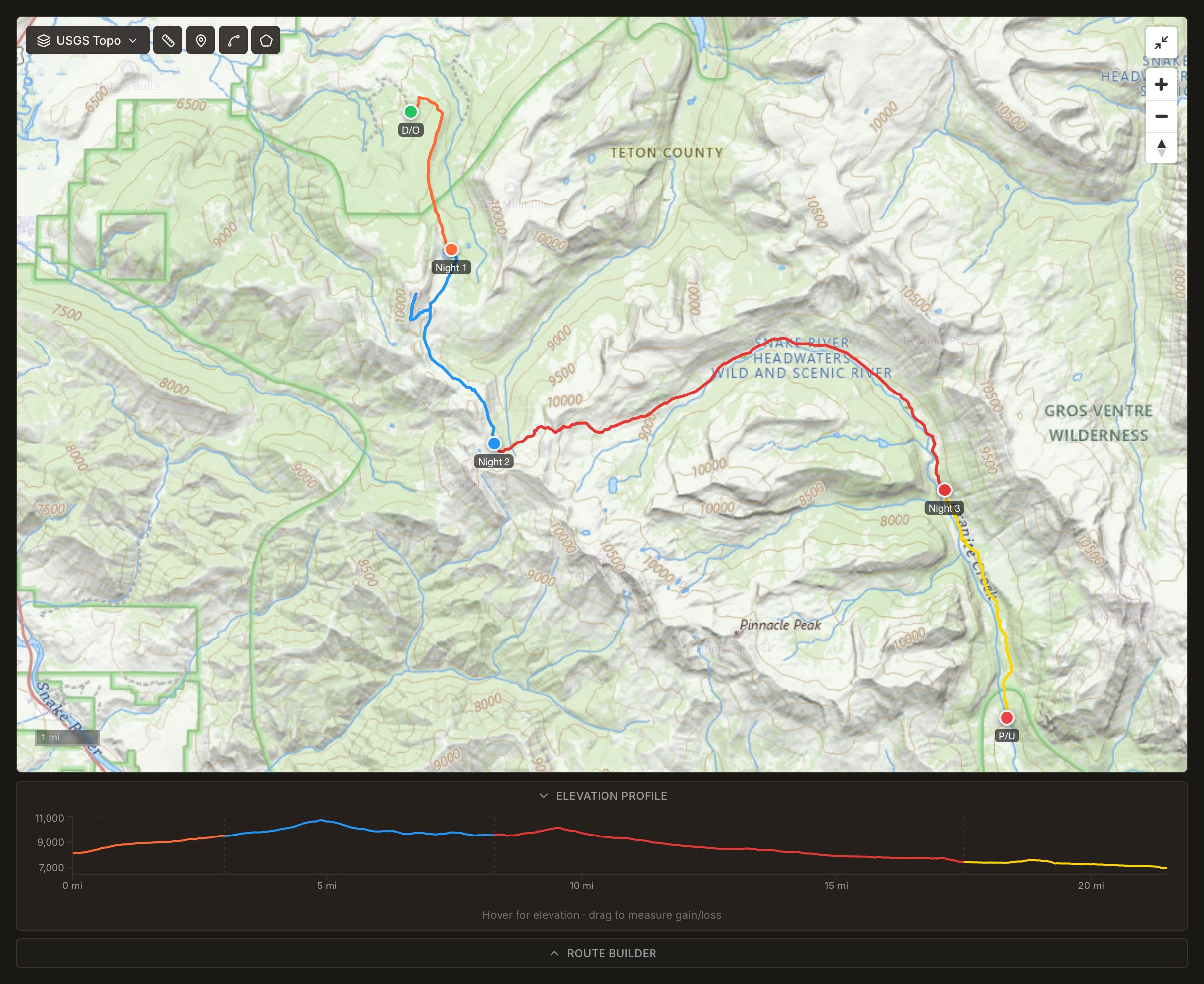
The map has the tools a backcountry planner expects: a hillshade and land-ownership overlay so you can see who manages the ground you're on, a measure-and-bearing tool, and an elevation/coordinate readout. It declutters as you zoom, with labels and markers thinning out at low zoom and resolving as you move in, so a twelve-day route doesn't collapse into a wall of icons.
Field Risk OS builds an elevation profile for every routed trip using terrain elevation data along the actual route. The result is an accurate, per-day picture of gain and loss for each day, with day lines colored to match the route on the map, and a readout that tells you where you'll be along the route when you hover at any point.
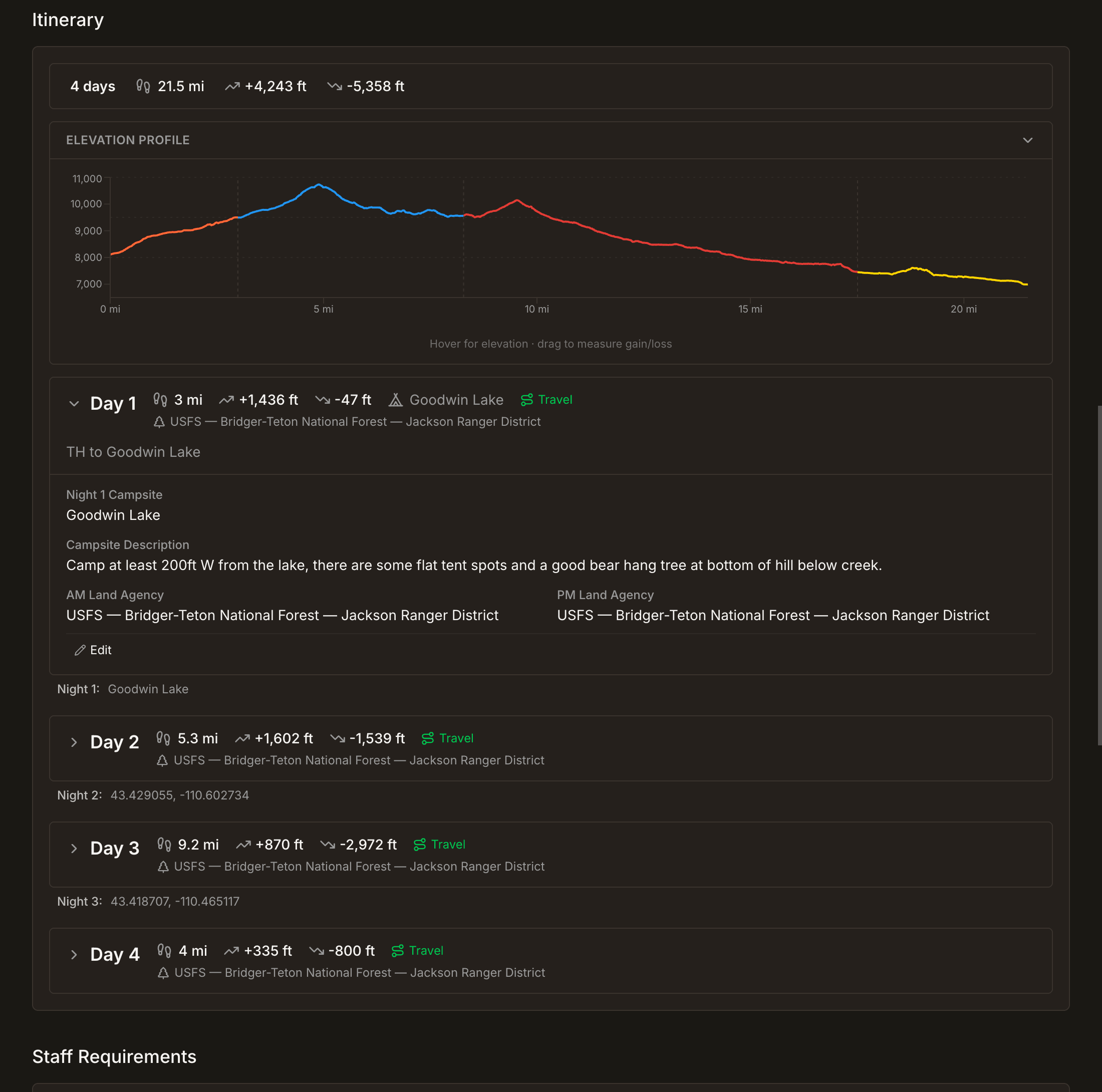
Your route, the hazards, the evacuation plan, and the land-management picture are on one map, inside the same system that holds the roster and the briefing.
The People Make the Trip
What makes a trip meaningful are the people on it, and the system keeps the things a leader actually needs to know as structured fields rather than buried in a free-text note. Each person's record carries information such as allergies, medical flags, dietary restrictions, and trip histories. Staff entries show their wilderness-medical certifications, like Wilderness First Responder (WFR), so leaders can see at a glance who has what certs.
Staff and participants are added to each trip instance.
Pre-Trip Briefings
The briefing is the moment a plan leaves the platform and becomes a real trip. The conversation is built as a structured walk-through, not a checkbox. The briefer and the leader move through the trip section by section (the route and its elevation profile, the itinerary day by day, the activity types, the roster with everyone's details, the hazards, the documents), and the briefing renders the same data the trip page does, so what's planned is exactly what's reviewed. It's also the moment the template's accumulated detail reaches the person who will use it in the field.
When it's done, the briefing is captured as a dated record: a snapshot of what was covered, by whom, and when. That's the artifact a program can stand behind. Not "we briefed the trip" as a memory, but a complete, time-stamped record of what was reviewed.
For the Record: Comms Logs and Incident Reports
A trip doesn't stop generating information the moment it leaves the trailhead. The communications that come in from the field and the incidents that get reported both attach to the specific trip, so they live on the same record as the route, the roster, and the briefing instead of scattering to a Google Form or a filing cabinet.
The comms log is a timestamped record of every contact between the field and the program: sat phone calls, inReach messages, or however you talk to your people on trips. Each entry is tied to the trip, so the log reads as a single timeline. Incident reports attach the same way. A wilderness incident report is a structured record linked to the trip, its people, and the activity at the time, and the exposure data comes with it, like incident rates adjusted for program days, is what turns a pile of reports into something you can actually analyze.
This is also where the system closes the loop. The lessons that surface in a comms log or an incident report don't just sit on one trip's record. They can be pushed into the trip template, so the next group that runs the route inherits them, and they show up again in the briefing where they matter most.
Post-Trip Debriefs
When the group is back at base, the trip ends with a structured debrief. Lessons learned carry forward into the template, so they reach every future trip and every future briefing. Each run of a route is a little sharper than the last.
Exports: Your Trip Packet
Any template or trip can be exported as a single packet, one PDF containing every piece of the trip. The overview, the route map, the elevation profile, the full itinerary, staffing, hazards, emergency info, and the roster with details. For a completed trip, the packet also pulls in the completed briefing, the comms log, any incident reports, and the debrief, so the export is the whole history of the trip and not just the plan. Attached PDF documents, permits and the rest, are merged right into the file.
A trip packet always leads with a live trip summary built from the current record, not a stale snapshot, so the file is accurate as of the moment you export it. You can download it or email it, and for external mapping systems, there's a GPX export of the route.
Why It Matters for Your Program
If you run backcountry trips, you probably already do all of this. It's just spread across a mapping app, a stack of spreadsheets, an email inbox, paper forms that don't talk to each other, and a few people's memories. Field Risk OS's trip management system puts it in one place your whole team can see, keeps your institutional knowledge when staff turn over, and hands your leaders a complete, accurate, field-ready packet for every trip you run.
If your program runs multi-day backcountry expeditions, let's connect and explore how Field Risk OS works on one of your own routes. The system is live and operational today. Reach me at george@fieldrisksystems.com.
Field Risk OS™ is a documentation and workflow software for outdoor expedition programs.
Common Questions
What is expedition trip planning software?
What is the difference between a trip template and a trip?
Can trip planning software calculate user days and land use for permits?
How does trip planning software preserve institutional knowledge when staff turn over?
Join the Email List
Notes and stories from the field and building Field Risk OS™.